
InsightsSaaS
How to Build an AI Agent From Scratch (2026 Guide)
Learn how to build an AI agent from scratch—architecture, LLM selection, tools, and deployment strategies for production-ready autonomous systems.

Most software follows instructions. An AI agent makes decisions.
You give it a goal. It determines the steps, calls the necessary tools, checks its own progress, and continues until the job is complete, all without requiring someone to click buttons in between. That is what separates AI agents from every other piece of software your business has ever used.
Today, businesses are utilizing AI agents to handle customer service conversations, process invoices, qualify leads, monitor systems, and automate complex workflows that previously required hours of human effort. The companies building these systems are not waiting for AI to become more mainstream. They are already running them in production. According to Gartner, the global AI agent market reached $7.84 billion in 2025 and is projected to hit $52.62 billion by 2030, with 40% of enterprise applications expected to feature task-specific agents by the end of 2026.
This guide is for founders, product leaders, and developers who want to understand how to build an AI agent from scratch, what the architecture looks like, which large language models to use, how to connect tools and data, and what it actually takes to deploy AI agents that work reliably in the real world.
What Is an AI Agent?
An AI agent is a software system that can perceive its environment, make decisions, and autonomously perform tasks to achieve a specific goal without needing a human to direct every step.
The word "agent" comes from the idea of agency: the ability to act independently. Traditional software runs when you tell it to and stops when it is done. An AI agent can plan a sequence of actions, use tools, handle unexpected situations, and adapt in real time based on what it discovers along the way.
Here is a simple example. You ask a traditional chatbot: "What is the status of my order?" It looks up a fixed answer and returns it. You ask an AI agent the same question, and it checks your order system, sees there is a delay, looks up the supplier contact, drafts an update email, flags the issue for your operations team, and updates the customer all on its own.
That is the difference. A chatbot answers. An AI agent acts.
The three things that define an AI Agent
Perception. The agent takes in information from its environment, user messages, database queries, API responses, file contents, and real-time data feeds.
Reasoning. Using a large language model as its brain, the agent decides what to do next based on what it has perceived and what goal it is trying to achieve.
Action. The agent executes tasks calling APIs, writing to databases, sending messages, running code, browsing the web, or calling other agents.
How AI Agents Are Different From Chatbots
This is the question most people ask first, and it is worth answering with specifics rather than slogans.
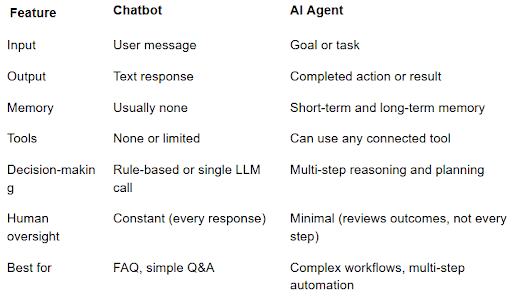
A customer service chatbot answers questions. A customer service AI agent handles the entire support workflow, reads the ticket, checks the account, looks up the order history, decides whether to resolve it automatically or escalate, drafts and sends the response, and logs the resolution, with no human in the loop for routine cases.
The shift from chatbot to agent is the shift from answering to doing.
Types of AI Agents
Not all AI agents work the same way. The right architecture depends on what you are trying to build.
1. Reactive Agents
These respond to the current input without maintaining memory of past interactions. They are the simplest type and work well for straightforward tasks where context does not carry over between sessions.
Example: An agent that monitors your server logs and sends an alert whenever error rates spike above a threshold.
2. Memory-Augmented Agents
These maintain memory either within a session (short-term) or across sessions (long-term). Long-term memory lets the agent remember previous conversations, user preferences, and past decisions.
Example: A sales assistant agent that remembers every previous conversation with a prospect and personalizes its approach based on what it knows about them.
3. Tool-Using Agents
These can call external tools APIs, databases, code interpreters, search engines, and calculators to complete tasks they cannot handle with reasoning alone. Most production agents are tool-using agents.
Example: A financial analysis agent that pulls real-time market data, runs calculations, and generates a formatted report.
4. Multi-Agent Systems
Multiple specialized agents work together, each handling a specific part of a larger workflow. One agent plans, another executes, another reviews. Multi-agent systems handle complexity that a single agent cannot manage alone.
Example: A software development workflow where a planning agent breaks down a feature request, a coding agent writes the implementation, and a testing agent validates the output.
5. Autonomous Agents
Agents that run continuously in the background, monitor for conditions, make decisions, and perform actions with minimal human oversight. These are the most powerful types and require the most careful design and safety planning.
Example: An inventory management agent that monitors stock levels, predicts demand based on historical patterns, places purchase orders automatically, and alerts the team only when exceptions require human judgment.
Core Components of an AI Agent
Before you write a single line of code, you need to understand what an AI agent is made of. Every production AI agent has the same five core components.
1. The Language Model (The Brain)
The large language model gives your agent its reasoning capability. It reads the context, decides what to do next, and generates the output, whether that is a plan, a tool call, or a final response.
The leading models for agent work today are Claude Opus 4.7 and Sonnet 4.6 from Anthropic, GPT-5.5 and GPT-5.4 from OpenAI, and Gemini 3.1 Pro from Google. Each has different strengths in reasoning depth, context window size, tool-use accuracy, and cost per token.
The right model depends on your use case. For complex multi-step reasoning, a more powerful model is worth the higher cost. For high-volume, lower-complexity tasks, a faster and cheaper model, like Claude Haiku 4.5 or GPT-5.4-mini, reduces operating costs significantly without meaningful quality loss.
2. Memory
Without memory, every conversation starts from zero. An AI agent needs memory to be genuinely useful across sessions.
Short-term memory stores the current conversation context, what has been said in this session, what tools have been called, and what results came back.
Long-term memory stores information that persists across sessions, user preferences, past decisions, and the knowledge the agent has accumulated. This is typically stored in a vector database and retrieved when relevant.
3. Tools
Tools are what let an AI agent interact with the real world. Without tools, an agent can only reason and generate text. With tools, it can do things.
Common tools include web search, code execution, database read/write, API calls, file management, email and calendar access, and calls to other agents. The agent decides which tool to use based on the task at hand. The Model Context Protocol (MCP), introduced by Anthropic and now adopted across the industry, is becoming the standard way to connect agents to tools and data sources.
4. Planning and Reasoning
For multi-step tasks, the agent needs to break down a goal into a sequence of steps, execute them in the right order, and handle failures or unexpected results along the way.
Common reasoning patterns include ReAct (Reasoning and Acting), Chain-of-Thought, and Tree of Thoughts. The choice affects how the agent approaches complex problems and how reliably it reaches the correct outcome.
5. Orchestration Layer
The orchestration layer manages the flow between the language model, memory, and tools. It handles the loop: perceive → reason → act → perceive → reason → act, until the task is complete or a stopping condition is met.
The leading orchestration frameworks are LangGraph, the OpenAI Agents SDK, CrewAI, and Google's Agent Development Kit (ADK). Microsoft has shifted AutoGen to maintenance mode in favor of its broader Microsoft Agent Framework, so AutoGen is generally not recommended for greenfield 2026 projects.
How to Build an AI Agent: Step-by-Step
Here is the complete process for building an AI agent from scratch in 2026.
Step 1: Define the Goal and Scope
The most common mistake in AI agent projects is starting with the technology before defining the problem. Before you write any code, answer these questions clearly:
What specific task or workflow will this agent handle?
Who are the users, human users interacting directly, or other systems triggering the agent?
What does success look like? What measurable outcome will tell you the agent is working?
What are the boundaries? What should the agent never do without human approval?
A well-defined scope prevents scope creep during development and makes it much easier to evaluate whether the agent is working correctly.
Step 2: Map the Workflow
Draw out the workflow the agent will handle from start to finish. Identify every decision point, every data source the agent will need to access, every action it will need to take, and every place where a human needs to be in the loop.
This workflow map becomes the blueprint for your agent's tools, memory requirements, and planning logic.
Step 3: Choose Your Language Model
Your choice of a large language model affects the agent's reasoning quality, cost, speed, and the complexity of tasks it can handle. In 2026, the main considerations are:
Context window size: How much information can the model process in one call? Longer contexts let the agent handle more complex tasks with richer history.
Tool use accuracy: How reliably does the model call the right tools with the right parameters? This varies significantly between models.
Cost per token: For high-volume agents, model cost adds up quickly. Start with a capable model and optimize cost after you have confirmed the agent works correctly.
Latency: For customer-facing agents where real-time responses matter, response speed is a practical constraint.
Most production teams start development with a high-capability model for accuracy, then explore switching to a faster and cheaper model for the parts of the workflow where the full reasoning power is not needed.
Step 4: Define the Tool Set
List every tool your agent needs to complete their tasks. For each tool, define the input it accepts, the output it returns, and any authentication or rate limit requirements.
Keep your initial tool set minimal. Every tool you add increases the complexity of the agent's decision-making and the surface area for errors. Start with the tools that are strictly necessary for the core workflow and add more after the agent is working reliably.
Step 5: Set Up Memory
Decide what your agent needs to remember and for how long.
For short-term memory, most orchestration frameworks handle conversation context automatically within a session.
For long-term memory, you need a vector database — Pinecone, Weaviate, and Chroma are the most commonly used options in 2026. You also need to decide what gets stored, when it gets stored, and how the agent retrieves relevant memories when it needs them.
Step 6: Choose Your Orchestration Framework
Your orchestration framework is the backbone of your agent. It manages the reasoning loop, tool calls, memory retrieval, and the flow between steps.
LangChain is the most widely used framework. It has extensive documentation, a large ecosystem of integrations, and support for both simple and complex agent architectures.
LangGraph is built on top of LangChain and adds explicit state management and graph-based control flow. It is better suited for complex multi-step workflows where you need precise control over the agent's decision path.
AutoGen from Microsoft is designed for multi-agent systems where multiple agents collaborate to solve a problem. It handles the communication and coordination between agents automatically.
CrewAI is a higher-level framework for building teams of agents with defined roles and a shared goal. It is easier to get started with, but it has less flexibility for highly custom architectures.
For most production use cases, LangGraph is the best balance of flexibility and control. For multi-agent systems, AutoGen or CrewAI reduces the complexity of coordinating agents significantly.
Step 7: Build and Test the Core Loop
Start with the simplest version of your agent that can complete the core task. Build the perception → reasoning → action loop, connect the essential tools, and test it end-to-end with real inputs.
At this stage, you are not optimizing for edge cases. You are confirming that the fundamental architecture works, the model reasons correctly, tools are called with accurate parameters, and results flow back into the context correctly.
Step 8: Add Error Handling and Guardrails
Production AI agents encounter unexpected situations: tools that return errors, inputs that are out of scope, and edge cases that the model handles incorrectly. Build explicit error handling into every tool call and define what the agent should do when it encounters something it cannot handle: escalate to a human, log the failure, or retry with a different approach.
Guardrails define what the agent is not allowed to do. For a customer service agent, this might mean never sharing customer data with unauthenticated requesters, never making refunds above a certain threshold without human approval, or always confirming before sending external communications.
Human oversight should be built into the agent's logic, not added as an afterthought. Define the specific conditions that require a human review before the agent proceeds.
Step 9: Evaluate Performance
Before you deploy AI agents to production, you need a way to measure whether they are working correctly. Build an evaluation set, a collection of real inputs with known correct outputs, and run your agent against it systematically.
Key metrics to track:
Task completion rate: What percentage of tasks does the agent complete correctly end-to-end?
Tool call accuracy: Is the agent calling the right tools with the right inputs?
Hallucination rate: Is the agent generating information that is not supported by its tools or context?
Latency: How long does each task take to complete?
Cost per task: What is the average cost in model tokens per completed task?
Do not deploy until your task completion rate meets your quality threshold. A production AI agent that fails frequently causes more problems than it solves.
Step 10: Deploy and Monitor
Deployment is not the end of the process. A production AI agent needs continuous monitoring to catch regressions, edge cases that evaluation did not cover, and changes in the underlying model behavior when providers update their APIs.
Set up logging for every agent run: inputs, tool calls, outputs, latency, and errors. Build dashboards that make it easy to spot patterns in failures. Review a sample of agent outputs regularly, especially in the early weeks after deployment.
If you want to deploy AI agents without building the infrastructure from scratch, our AI & ML Solutions team handles the full stack architecture, development, deployment, and monitoring.
Tools and Frameworks for Building AI Agents in 2026
Here is a practical overview of the tools you will use across the different layers of your agent.
Language Models
GPT-4o (OpenAI): Best for general-purpose use and strong tool-calling capabilities.
o3 / o4-mini (OpenAI): Best for complex reasoning, math, and coding tasks.
Claude 3.7 Sonnet (Anthropic): Best for long-context understanding and nuanced reasoning.
Gemini 1.5 Pro (Google): Best for multimodal tasks and very large context windows.
Llama 3 (Meta, open source): Best for self-hosting and cost control.
Orchestration Frameworks
LangGraph: Best for complex single-agent workflows with state management.
AutoGen: Best for multi-agent systems and agent collaboration.
CrewAI: Best for role-based agent teams.
LangChain: General-purpose framework with a large ecosystem.
Semantic Kernel (Microsoft): Best for Azure-based environments.
Vector Databases for Memory
Pinecone: Managed solution, easy to scale.
Weaviate: Open source with strong filtering capabilities.
Chroma: Lightweight and ideal for prototyping.
pgvector: PostgreSQL extension, useful if you already use Postgres.
Agent Monitoring Tools
LangSmith: Used for tracing, evaluation, and debugging LangChain agents.
Helicone: Used for cost tracking and latency monitoring.
Arize AI: Used for ML observability and drift detection.
How to Deploy AI Agents in Production
Getting an agent working in a local environment is one thing. Running it reliably at scale in production is a different challenge entirely.
Containerize your Agent
Package your agent as a Docker container. This makes it consistent across environments and easy to deploy to any cloud provider. Define resource limits carefully — LLM API calls are latency-sensitive, and agents can consume significant compute if not managed carefully.
Use async processing for long-running tasks
AI agents that automate complex workflows can take minutes to complete a task. Do not block your users waiting for synchronous responses. Use a message queue (Redis, RabbitMQ, or AWS SQS) to process agent tasks asynchronously and notify users when the task is complete.
Implement rate limiting and cost controls
LLM API calls cost money per token. Without cost controls, a single misbehaving agent can generate unexpected bills. Set per-user and per-task token budgets. Monitor spend in real time and alert when usage exceeds expected ranges.
Plan for model updates
LLM providers update their models regularly. A model update can change your agent's behavior in subtle ways that break specific workflows. Pin your agent to a specific model version in production and test new versions in a staging environment before switching.
Build a human escalation path
Every production AI agent should have a clear path to escalate to a human when it encounters something outside its scope. This is not a failure of the agent — it is good system design. Agents that try to handle everything autonomously without human oversight make more errors and cause more damage than agents with well-defined escalation logic.
Our custom web development team builds the backend infrastructure, APIs, queues, databases, and monitoring that production AI agents need to run reliably at scale.
AI Agent Use Cases by Industry
Customer Service
AI agents in customer service autonomously perform tasks like reading incoming support tickets, checking customer data and order history, resolving common issues without human involvement, escalating complex cases with full context, and drafting responses that match your brand voice. Businesses deploying these agents report handling 60 to 80 percent of tier-one tickets without human involvement, which dramatically reduces the time and effort your support team spends on repetitive tasks.
Fintech and Financial Services
In financial services, AI agents analyze transactions for fraud patterns in real time, generate portfolio rebalancing recommendations, process loan applications against defined criteria, and generate compliance reports automatically. For fintech platforms specifically, agents that can automate complex multi-step processes reduce operational costs significantly while improving the customer experience. Our fintech industry expertise means we understand the compliance and security requirements these agents need to meet.
Healthcare
Healthcare AI agents handle appointment scheduling and reminders, insurance pre-authorization workflows, patient intake data collection, and medical records summarization for clinicians. They reduce the administrative burden on clinical staff, letting them focus on patient care rather than paperwork. Any healthcare agent must meet strict data privacy requirements, which require careful architecture from the start. See how we approach healthcare software development.
Real Estate
In real estate, AI agents qualify leads by asking the right questions and scoring them against your buyer criteria, schedule property viewings, follow up with prospects automatically, and generate property analysis reports from market data. These agents handle the repetitive tasks that consume agent time and effort, freeing up real estate professionals to focus on high-value client relationships.
Logistics and Operations
Logistics AI agents monitor shipment status across multiple carriers, flag delays before they become customer problems, automate supplier communication, and optimize routing in real time based on live traffic and capacity data. Our logistics industry work has given us direct experience with the operational complexity these systems need to navigate.
Common Mistakes to Avoid
1. Building before defining the goal
The most expensive mistake in any AI project is building the wrong thing. Spend time defining exactly what problem the agent is solving and what success looks like before writing a single line of code. Our MVP and product strategy process is specifically designed to validate these questions before development begins.
2. Giving the agent too many tools too early
Every tool you add increases the complexity of the agent's decision-making. Start with the minimum tool set required for the core workflow and add more only after the agent is working reliably. An agent with three well-defined tools outperforms one with fifteen poorly defined ones.
3. Skipping evaluation
Deploying an agent without a systematic evaluation process means you do not know how well it actually works until something goes wrong in production. Build an evaluation set before you deploy and run it after every significant change.
4. Removing human oversight too early
It is tempting to let a well-performing agent run completely autonomously. Resist that temptation until you have months of production data showing the agent handles edge cases correctly. Start with human oversight for all decisions above a certain risk threshold. Remove it gradually as you build confidence.
5. Underestimating the importance of prompts
The quality of your system prompt has a larger impact on agent performance than almost any other design decision. Unclear instructions, missing context, or poorly defined tool descriptions lead to incorrect tool calls, wrong decisions, and hallucinations. Treat prompt engineering as a first-class engineering activity — not an afterthought.
6. Ignoring cost management
A production AI agent making thousands of LLM API calls per day generates real costs. Model costs, API fees, and compute all add up. Build cost monitoring in from the start and optimize continuously as you learn your agent's actual usage patterns.
How Codieshub Builds AI Agents
At Codieshub, we have built AI systems for clients across fintech, healthcare, real estate, logistics, and SaaS. Here is how we approach AI agent development.
We start with the problem, not the technology. Before we talk about which model or framework to use, we map the workflow, define the success criteria, and identify the specific tasks the agent needs to handle. This prevents the most common and most expensive mistake in AI projects: building a technically impressive system that does not solve the actual business problem.
We build for reliability, not just capability. An AI agent that works 80 percent of the time is not production-ready. We build evaluation pipelines, error handling, and monitoring from the start so agents perform consistently, not just impressively in demos.
We design for human oversight. Every agent we build has clear escalation paths, audit logs, and controls that let your team review, override, and improve agent behavior over time. Autonomous does not mean unaccountable.
We stay involved after launch. AI agents need maintenance model updates, new edge cases, and evolving workflows. We build long-term partnerships with clients and stay invested in the agent's performance after it ships.
Our AI & ML Solutions service covers the full stack: architecture design, model selection, tool integration, deployment infrastructure, and ongoing monitoring.
Tell us what you are trying to automate. We will send you a tailored plan within 48 hours. Get a Free Project Estimate
Frequently Asked Questions
1. What is an AI agent in simple terms?
An AI agent is a software system that takes a goal, plans steps, uses tools, and completes tasks with minimal human help. Unlike a chatbot that only responds to prompts, an AI agent can act independently, call APIs, make decisions, and execute multi-step workflows to achieve real outcomes.
2. How is an AI agent different from generative AI?
Generative AI creates content like text, images, or code based on prompts, while an AI agent uses generative AI as its reasoning engine, but adds tools, memory, and action capabilities. It can complete full workflows, not just respond, making it more autonomous and task-oriented than standard generative AI.
3. What large language models are best for building AI agents in 2026?
GPT-4o and o-series models are best for reasoning and tool use, while Claude 3.7 Sonnet excels in long-context understanding. Gemini 1.5 Pro supports multimodal tasks, and Llama 3 is ideal for self-hosted setups. The right model depends on cost, performance needs, and deployment environment.
4. How much does it cost to build an AI agent?
Costs vary by complexity. A basic agent costs around $15K–$40K and takes 4–8 weeks. Production-grade systems range from $60K–$150K with multi-month timelines. Advanced multi-agent enterprise systems can exceed $150K–$400K. Ongoing costs depend mainly on LLM usage and request volume.
5. Do AI agents need human oversight?
Yes, especially in the early stages. AI agents can make mistakes in edge cases, so human review, escalation paths, and audit logs are essential. Over time, as reliability improves through data and monitoring, oversight can be reduced for low-risk tasks while remaining for critical decisions.
6. Can AI agents work with existing software systems?
Yes, AI agents integrate easily with existing systems like CRM, ERP, databases, and APIs. They act as intelligent layers that read and write data, trigger workflows, and automate processes without replacing your current infrastructure. They enhance systems rather than requiring full rebuilds.
7. What is the difference between an AI agent and an agentic AI system?
An AI agent is a single autonomous system that performs tasks independently. An agentic AI system is a broader architecture where multiple specialized agents work together under coordination. This multi-agent setup handles more complex workflows by dividing responsibilities across different intelligent components.
8. How do I keep my AI agent from making mistakes?
You reduce errors through strong system design: clear prompts, defined tools, proper guardrails, and thorough testing. Add human oversight for high-risk actions and implement logging and monitoring. Continuous evaluation and improvement are essential since no AI agent is completely error-free in real-world scenarios.