
InsightsSaaS
How to Design a SaaS Dashboard in 2026: Step-by-Step Guide
Learn how to design a SaaS dashboard in 2026 with proven principles, step-by-step guidance, and real-world examples that drive user action.

In 2026, a well-designed SaaS dashboard is no longer just a nice-to-have; it’s essential for businesses and teams relying on data to make decisions quickly. Modern SaaS solutions often include dashboards that turn complex metrics into clear, actionable insights, helping users track performance, monitor trends, and improve productivity.
A poorly designed dashboard can confuse users, hide key information, and reduce efficiency. That’s why understanding the principles of SaaS dashboard design, current trends, and common mistakes is crucial for creating interfaces that are both user-friendly and impactful.
This guide will walk you through everything you need to know, from types of dashboards and design principles to real-world examples and a practical step-by-step process, so you can build dashboards that truly support your business goals.
Jump To Section
What are SaaS Dashboards?
Why Do Most SaaS Dashboards Fail?
Types of SaaS Dashboards
Principles of Effective Dashboard Design
Understanding The SaaS Dashboard Design Process (Step-by-Step)
What Are The Top SaaS Dashboard Design Trends In 2026
Common SaaS Dashboard Design Mistakes
Real-World SaaS Dashboard Design Examples (With Analysis)
SaaS Dashboard Design Checklist For Designers
How to Choose a SaaS Dashboard Design Agency?
Conclusion & Next Steps
Frequently Asked Questions
What are SaaS Dashboards?
A SaaS dashboard is a visual interface that displays key data and metrics from a software-as-a-service (SaaS) product. Dashboards help users track performance, monitor trends, and make informed decisions quickly. They turn complex data into simple visual elements like charts, graphs, and tables, making information actionable. Today, most SaaS teams expect their dashboards to work seamlessly across devices, which is why mobile app development has become a core part of building modern SaaS products, not an afterthought.
Why Do Most SaaS Dashboards Fail?
Many dashboards fail because they are overloaded with data, hard to navigate, or poorly structured. A strong focus on UI/UX design can prevent these issues by ensuring dashboards are intuitive, visually clear, and easy for users to interact with. Common reasons include:
Showing irrelevant metrics
Lack of focus on user goals
Complex visualizations that confuse users
Poor responsiveness on different devices
By understanding these pitfalls, designers can create dashboards that are user-friendly, actionable, and effective.
Types of SaaS Dashboards
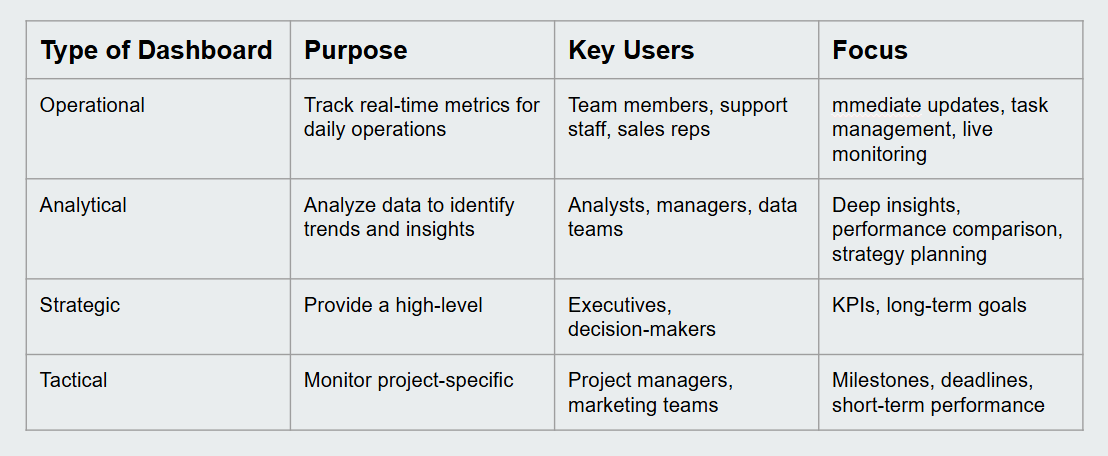
SaaS dashboards come in different types depending on the user’s goals and the data they need to track. Implementing these dashboards often requires custom web development to ensure they integrate seamlessly with your product’s backend and provide a tailored user experience. Understanding these types helps you choose the right dashboard for your product or business.
1. Operational Dashboards
These focus on real-time metrics that support daily operations. They help teams monitor tasks, track sales, or manage customer support efficiently. Operational dashboards are ideal for users who need quick updates and immediate insights.
2. Analytical Dashboards
Analytical dashboards are designed for in-depth data analysis. They help users identify trends, compare performance over time, and make data-driven decisions. These dashboards are perfect for managers and analysts who need insights to plan and optimize strategies.
3. Strategic Dashboards
Strategic dashboards provide a high-level overview of business performance. They focus on key performance indicators (KPIs) and long-term goals. Executives and decision-makers use these dashboards to track growth, monitor progress, and guide strategy.
4. Tactical Dashboards
Tactical dashboards are for teams focusing on specific projects or campaigns. They help track project milestones, deadlines, and short-term performance metrics. These dashboards are actionable and align team efforts with business objectives.
By choosing the right type of dashboard, you can ensure your SaaS product delivers relevant insights and improves user experience.
Principles of Effective Dashboard Design
1. Start with User Goals, Not Data
Avoid designing dashboards solely around available data. Focus on user needs first. Ask for each user role:
What decisions are made daily?
What information supports those decisions?
What actions should the dashboard enable?
Conduct interviews and observe users in their workflows to understand which data truly matters. Involve your UI/UX team from the start to ensure research informs design.
2. Establish a Clear Information Hierarchy
Not all metrics carry the same weight. Structure your dashboard into three layers:
Primary metrics (2–4): Core KPIs defining success. Display prominently at the top.
Secondary metrics (4–8): Contextual data supporting primary KPIs. Visible without scrolling.
Detailed data: Granular information accessible via drill-downs, expandable sections, or linked detail pages.
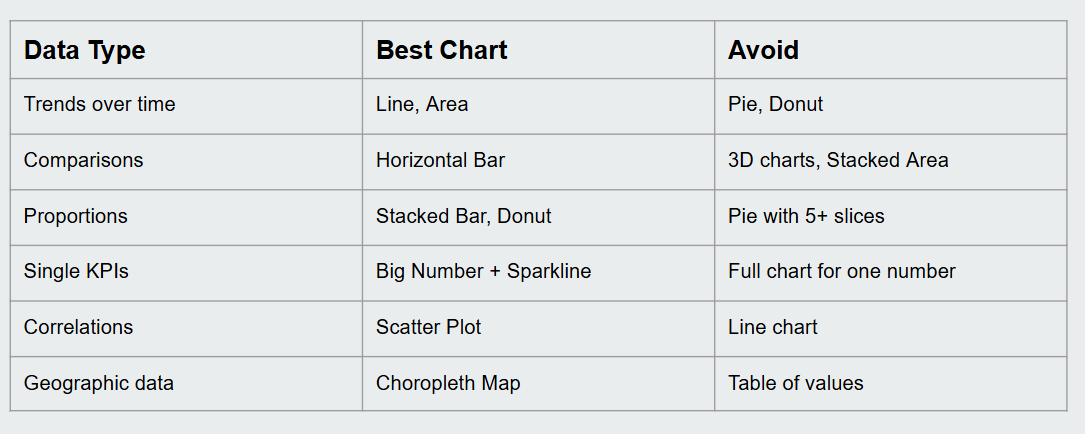
3. Choose the Right Chart for the Data
Select chart types based on data patterns:
4. Make Dashboards Actionable
Metrics should drive action. Users must be able to:
Drill into declining revenue to identify problematic segments.
Click urgent tickets to access details instantly.
Data without actionable paths becomes noise.
5. Enable Personalization and Customization
Let users tailor dashboards to their needs:
Choose which widgets to display.
Set time range defaults.
Save filtered views.
Power users can create advanced views, while casual users benefit from role-based smart defaults.
6. Design for Scannability
Dashboards are often glanced at, not studied. Use the five-second test: can a user understand key insights within five seconds? Support quick scanning with:
Color-coded status indicators
Clear trend arrows
Comparisons to previous periods
Understanding The SaaS Dashboard Design Process (Step-by-Step)
Creating an effective SaaS dashboard requires a structured approach that balances user needs, actionable insights, and business goals. A well-planned process ensures your dashboard is intuitive, insightful, and built to last.
Step 1: Define User Goals
Start by understanding what your users actually need to accomplish. Are they monitoring sales performance, tracking marketing campaigns, or evaluating operational data? This step isn't about data, it's about decisions. Every design choice that follows should trace back to a real user goal.
Step 2: Identify Key Metrics
Once goals are clear, select only the metrics that drive meaningful action. If a number doesn't change a decision, it doesn't belong on the dashboard. Work closely with stakeholders to separate signal from noise. A focused dashboard is always more powerful than a complete one.
Step 3: Plan the Layout and Wireframe
Sketch the dashboard layout before touching any design tool. Decide where primary KPIs, charts, filters, and tables will appear. Wireframing forces early decisions about hierarchy and flow, saving significant time during the actual UI/UX design phase when visual details come into play.
Step 4: Design Visual Elements
Choose colors, typography, and chart types that enhance readability and reduce cognitive load. Ensure the design is accessible and consistent; every visual element should serve a purpose, not just fill space. Responsiveness across devices should be considered here, not as an afterthought.
Step 5: Implement Interactivity
Static dashboards quickly become ignored dashboards. Enable users to drill down into data, apply filters, adjust date ranges, and explore details dynamically. This is where custom web development becomes critical. The interactions need to be fast, reliable, and connected to real backend data to actually be useful.
Step 6: Test with Real Users
Run usability tests with actual users before launch. Observe where they get confused, what they ignore, and what they wish they could do. The five-second test is useful here; if a user can't identify the key insight within five seconds, the layout needs work.
Step 7: Iterate and Improve
Launch is not the finish line. Collect feedback, monitor usage patterns, and refine continuously. The best dashboards evolve alongside the product teams that treat dashboard design as an ongoing process, consistently outperforming those that treat it as a one-time delivery.
What Are The Top SaaS Dashboard Design Trends In 2026
AI & ML Integration: Dashboards can predict trends and automate insights.
Personalized Experiences: Users can customize layouts and data views.
Dark Mode Dashboards: Easier on the eyes, preferred by many users.
Interactive Data Visualization: Clickable charts, real-time updates, and drill-down options.
Mobile-First Design: Dashboards designed for smartphones and tablets are becoming standard.
Common SaaS Dashboard Design Mistakes
Creating a SaaS dashboard is more than displaying data; poor design choices can confuse users, hide insights, and reduce productivity. Here are the most common mistakes and how to avoid them.
1. Designing Around Data Instead of Users
Many dashboards fail because they focus on what data is available rather than what users need. Start by understanding user roles, their daily decisions, and the actions your dashboard should enable. Conduct interviews and observe workflows to ensure real-world relevance.
2. Cluttered Dashboards
Including too many metrics, charts, or widgets overwhelms users and reduces clarity. Prioritize key KPIs, group related metrics, and use expandable sections for detailed data.
3. Ignoring Information Hierarchy
Treating all metrics equally leads to confusion. Establish a hierarchy: primary KPIs at the top, secondary metrics below, and granular data accessible through drill-downs.
4. Choosing the Wrong Chart Types
Using inappropriate charts can misrepresent data. For example, avoid pie charts with many slices or 3D effects. Match chart types to your data: trends → line/area, comparisons → bar, correlations → scatter.
5. Displaying Non-Actionable Metrics
Metrics that don’t lead to insight or action are noise. Every number should guide a decision, link to relevant details, or trigger a next step.
6. Lack of Personalization
Dashboards should accommodate different user needs. Allow users to select widgets, apply filters, save views, and provide smart defaults for casual users.
7. Poor Scannability
Users often glance at dashboards rather than study them. Use color-coded indicators, arrows, and comparisons to make the dashboard understandable within seconds.
8. Overloading with Colors or 3D Effects
Excessive colors, gradients, or 3D charts distract users and reduce readability. Stick to a clean, consistent design language.
9. Ignoring Mobile or Responsive Design
Many users access dashboards on mobile or tablets. Ensure your layout adapts across devices so critical metrics remain visible and usable.
Real-World SaaS Dashboard Design Examples (With Analysis)
Studying real-world SaaS dashboards helps understand effective design choices and learn from common pitfalls. Poor dashboard design doesn't just hurt usability; it directly impacts business outcomes. In fact, one of the biggest reasons AI projects fail is not the technology itself, but the inability to surface insights in a way users can act on. These real-world examples show exactly how thoughtful dashboard design bridges that gap.
1. Salesforce Dashboard
Overview: Salesforce dashboards focus on sales performance, opportunities, and pipeline tracking.
Why It Works:
Prioritizes key metrics like deals closed, revenue, and lead conversion rates.
Uses color-coded indicators to highlight performance against targets.
Allows drill-downs into detailed reports for deeper analysis.
Takeaway: Clear KPIs, actionable insights, and drill-down capabilities make it user-focused and actionable.
2. HubSpot Marketing Dashboard
Overview: HubSpot provides a marketing analytics dashboard showing campaign performance, website traffic, and lead generation.
Why It Works:
Visualizes trends with line and area charts for easy pattern recognition.
Segment data by campaigns, channels, and demographics for context.
Offers customization options to focus on metrics relevant to each marketing role.
Takeaway: Contextual metrics, trend visualization, and personalization improve decision-making efficiency.
3. Google Analytics Dashboard
Overview: Google Analytics dashboards monitor website performance, user behavior, and conversion rates.
Why It Works:
Provides a hierarchy: overview KPIs at the top, detailed metrics accessible below.
Employs clear charts like line graphs for trends and tables for granular data.
Users can create custom dashboards tailored to business goals.
Takeaway: Flexibility, scannability, and a clear data hierarchy make complex data manageable.
4. Mixpanel Product Dashboard
Overview: Mixpanel focuses on product analytics, tracking user engagement, retention, and feature adoption.
Why It Works:
Emphasizes actionable metrics: funnels, retention curves, and cohort analysis.
Interactive charts allow filtering and segmenting to answer specific product questions.
Dashboard design supports quick scanning with concise KPIs.
Takeaway: Interactive, actionable, and focused on user behavior, driving product decisions.
5. Intercom Support Dashboard
Overview: Intercom dashboards track support tickets, response times, and customer satisfaction.
Why It Works:
Highlights urgent tickets with clear status indicators.
Links metrics directly to ticket details for immediate action.
Customizable views help support teams focus on relevant KPIs.
Takeaway: Actionable design and prioritization enhance team responsiveness and productivity.
SaaS Dashboard Design Checklist For Designers
Use this checklist before launching any SaaS dashboard to ensure it's user-ready, actionable, and built to perform.
1. Identify User Goals
Before designing anything, confirm what each user role needs to accomplish. A sales manager and a support agent need completely different dashboards, even within the same product.
2. Define Key Metrics (KPIs)
List only the metrics that drive decisions. If a number doesn't lead to action, it doesn't belong on the dashboard. Aim for 2–4 primary KPIs visible above the fold.
3. Prioritize and Group Related Data
Organize metrics by importance, primary KPIs at the top, supporting data below, and detailed drill-downs accessible on click. Avoid dumping everything on one screen.
4. Choose Clear Visualizations
Match your chart type to your data. Trends → line charts. Comparisons → bar charts. Part-to-whole → donut charts. Never use 3D effects or pie charts with more than 5 slices.
5. Test on Multiple Devices
Your users aren't always at a desktop. Test every dashboard view on mobile and tablet to ensure critical metrics remain visible and usable across all screen sizes.
6. Include Interactive Elements
Static dashboards limit insight. Add filters, date range selectors, drill-downs, and clickable charts so users can explore data and answer their own questions.
7. Ensure Fast Load Times
A dashboard that takes 5 seconds to load will be ignored. Optimize queries, lazy-load heavy charts, and test performance under real data volumes before shipping.
8. Collect User Feedback and Iterate
Launch is not the finish line. Run the five-second test with real users, collect feedback, and refine. The best dashboards are continuously improved based on how people actually use them.
How to Choose a SaaS Dashboard Design Agency?
Choosing the right agency is critical. Here's what actually matters:
1.SaaS Experience:
Work with a team that has built real SaaS products, not just marketing sites. Codieshub has shipped 50+ products across SaaS, fintech, and healthcare.
2.Design + Development Together:
Agencies that separate design from dev cause delays and miscommunication. At Codieshub, UI/UX designers and developers work together from day one.
3. Real Portfolio:
Skip the mockups. Ask for live products. Check Codieshub's case studies to see how we've built clean, data-driven interfaces that actually shipped.
4. Discovery First
A good agency understands your users before opening Figma. Our Discovery Sprint validates your concept and delivers a prototype in 4–8 weeks.
5. Long-Term Support:
Your dashboard will evolve. Choose a partner, not just a vendor.
Ready to build? Get a Free Project Estimate. We'll send you a game plan in 48 hours.
Conclusion & Next Steps
Designing a SaaS dashboard in 2026 requires understanding user needs, focusing on key metrics, and presenting data clearly. Following best practices, leveraging top design trends, and avoiding common mistakes ensures dashboards are effective, actionable, and built to support real business decisions.
The difference between a dashboard users trust, and one they ignore comes down to thoughtful design, clear hierarchy, the right visualizations, and a relentless focus on what users actually need to accomplish.
Start planning your dashboard today and create interfaces that improve decision-making, engagement, and long-term business performance. If you're ready to build something that actually works, get a Free Project Estimate, and we'll send you a tailored game plan within 48 hours.
Frequently Asked Questions (FAQ)
1. What is a SaaS dashboard?
A SaaS dashboard is a visual interface that displays key metrics from a software-as-a-service (SaaS) product. It helps users monitor performance, analyze trends, and make informed decisions. Modern SaaS solutions integrate dashboards to provide actionable insights for marketing, sales, finance, and operational teams efficiently.
2. Why do most SaaS dashboards fail?
Most dashboards fail because they focus on data rather than user needs, lack clear UI/UX design, or overwhelm users with information. Poor navigation, irrelevant metrics, and unclear hierarchy reduce productivity. Well-designed dashboards prioritize user goals and ensure actionable insights, improving efficiency and decision-making across teams.
3. What types of SaaS dashboards exist?
SaaS dashboards include operational, analytical, and strategic types. Operational dashboards track real-time performance, analytical dashboards provide trends and comparisons, and strategic dashboards focus on high-level KPIs. Many modern dashboards also leverage AI & ML solutions to provide predictive insights and guide data-driven business decisions.
4. What are common mistakes in dashboard design?
Common mistakes include cluttered layouts, confusing visuals, non-actionable metrics, ignoring mobile responsiveness, and poor prioritization of user goals. Dashboards that fail to provide clarity or focus reduce user engagement. Following best practices in design ensures users can quickly interpret data and take informed actions.
5. How can AI & ML improve dashboards?
AI and ML enhance SaaS dashboards by predicting trends, automating insights, and recommending actions. Integrating AI & ML solutions allows businesses to anticipate performance changes, identify opportunities, and make smarter, proactive decisions. This makes dashboards more interactive, intelligent, and valuable for decision-makers across roles.
6. What trends are expected in 2026 for SaaS dashboards?
In 2026, dashboards will emphasize AI-powered insights, interactive visualizations, personalized layouts, dark mode, and mobile-first design. Modern dashboards increasingly integrate AI & ML solutions and mobile app development to deliver predictive analytics and seamless accessibility, enabling users to make fast, informed decisions from any device.
7. How do I choose the right dashboard design agency?
Choosing the right agency requires evaluating their experience in SaaS solutions, UI/UX design, custom web development, and mobile app development. Check portfolios, request customization options, and ensure ongoing support. The right agency ensures dashboards are actionable, visually clear, and tailored to user needs, driving business performance.